
How to Evaluate a SaaS Product Before Licensing It
Before I license a SaaS product, I check five things: fit, reliability, data protection, support, and total cost. I start with a one-page brief that sets my must-haves, budget in U.S. dollars, usage estimates, and pass/fail rules.
Then I check:
- Features and rights: Can my team complete its tasks, and does the license allow our intended use, including white-label vs SaaS licensing rights for resale?
- Reliability and integrations: Do uptime records, recovery tests, and import/export tests meet our needs? Even 99.9% uptime allows 43 minutes and 12 seconds of downtime in a 30-day month.
- Security and data: Are controls tested, and are data use, ownership, and deletion terms written into the contract?
- Support and continuity: Who handles setup, fixes problems, and helps if the vendor shuts down?
- Terms and cost: What will we pay for setup, usage, renewals, and leaving - and what happens if the vendor fails?
My rule: <u>test the product, check the records, and put promises in writing</u>. I use a 100-point scorecard to compare findings, but a high score never cancels out a deal-breaker. Before signing, I resolve blockers, have counsel review the terms, and record the decision.
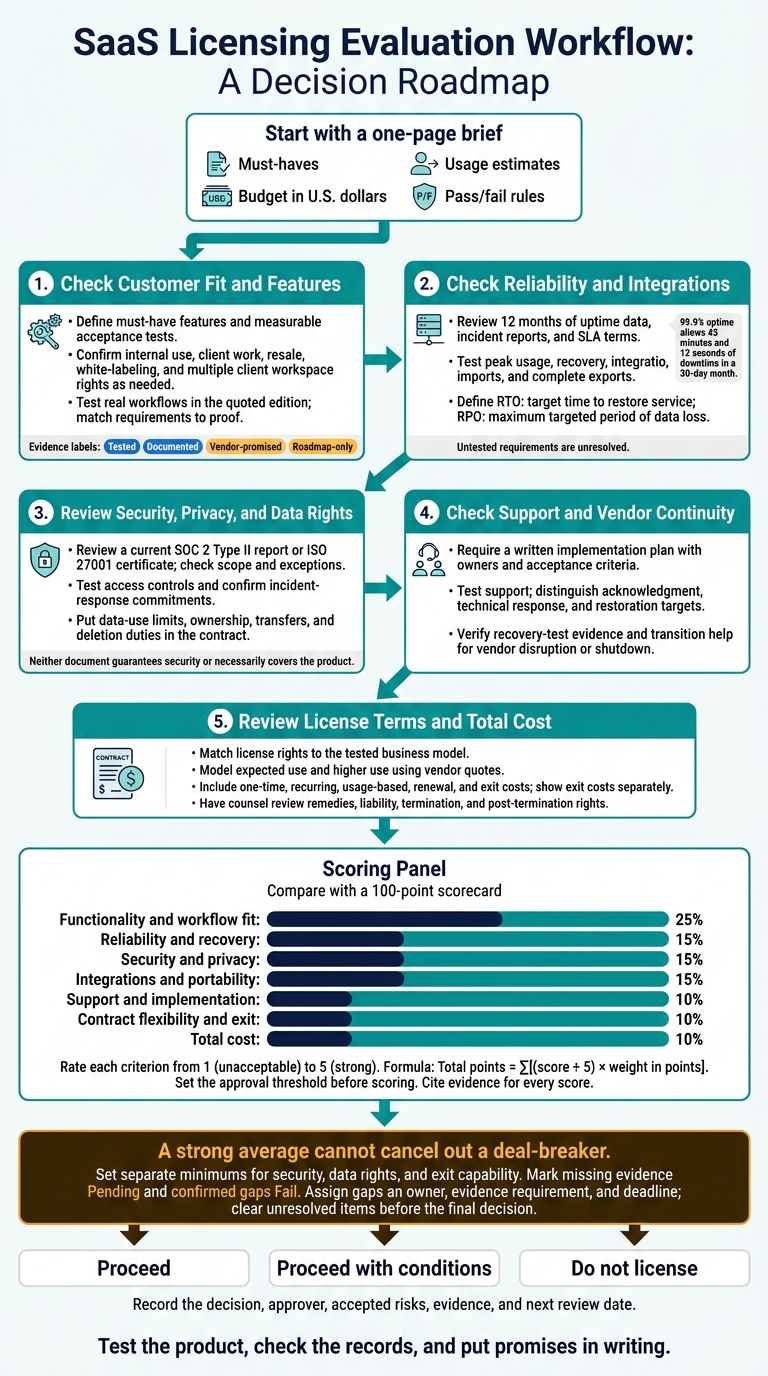
SaaS Evaluation: Five Stages Before Licensing
A Useful Template to Help Evaluate Tools
sbb-itb-8650f75
Stage 1: Check Customer Fit and Features
Turn your brief into clear requirements: customer type, tasks, users, and permitted use. Internal use, client work, resale, white-labeling, and multiple client workspaces require different rights. Confirm each one is allowed. Support for multiple workspaces does not, by itself, grant resale or branding rights.
List Required Features and Usage Limits
Sort features into must-have or optional. For each must-have, define a measurable acceptance test for roles, client separation, branding, customization, or required outputs.
Record user and administrator counts, client workspace counts, monthly transactions, API calls, storage, geographic restrictions, and industry-specific requirements. Ask whether each limit applies per user, workspace, or organization - and what happens if you exceed it.
Check the quoted edition, not just the advertised product. Request a current feature matrix, usage schedule, and sample order form. Confirm whether client users take up paid seats. Also check whether exports, API access, custom domains, and implementation-partner access are included or require upgrades.
Test Your Workflows in a Live Demo
Test the product as your team will use it. Request current documentation, a guided demo, sandbox access, a roadmap, and at least two references from customers with a similar industry and deployment size.
Have an actual user and administrator test client onboarding, including roles, import, approval, reporting, export, and access removal. Use sanitized data. Record elapsed time, errors, missing fields, manual steps, and any vendor intervention. Test rejected imports and cross-client permission checks, too.
Match Each Requirement to Proof
Use the checklist below to track evidence; the checklist itself is not proof. Mark each capability as tested, documented, vendor-promised, or roadmap-only.
Get promised features - and how the vendor will handle feature removal or plan changes - in writing. A roadmap must-have stays unresolved unless the agreement defines delivery, acceptance criteria, and a remedy for non-delivery.
Default status: pending verification.
| Requirement | Evidence requested | Status | Unresolved gap |
|---|---|---|---|
| ☐ Support the required client workspaces | Plan limits, written confirmation, sandbox test | Pending | Workspace cap or upgrade requirement |
| ☐ Keep client users and records separate | Role documentation and cross-workspace permission test | Pending | Excess access or unavailable roles |
| ☐ Export all required records and fields | Export documentation and complete workflow test | Pending | Missing fields, manual steps, or fees |
| ☐ Permit resale and required branding | Proposed license, order form, written legal confirmation | Pending | Missing resale, sublicensing, or branding rights |
| ☐ Handle projected monthly usage | Usage schedule, capacity information, volume test | Pending | Untested capacity, throttling, or unclear limits |
| ☐ Deliver a roadmap item | Roadmap and written delivery commitment | Roadmap only | Delivery date, acceptance criteria, or remedy missing |
If Stage 1 passes, move to uptime, integration, and recovery testing.
Stage 2: Check Reliability and Integrations
Once you confirm the product fits your needs, check that it can stay available, connect to your systems, and handle your projected volume before you license it.
Review Uptime, Performance, and Recovery
Request 12 months of uptime data, incident reports, a sample SLA, and an architecture overview. Find out which services and environments the uptime calculation covers, which monitoring source governs the SLA, and which outages don’t count. 99.9% uptime allows 43 minutes and 12 seconds of downtime in a 30-day month.[6] Check maintenance exclusions, notice deadlines, credit-claim deadlines, and whether credits are your only remedy.[5]
Use the architecture overview to check hosting regions. Ask for backup locations, retention policies, and restoration-test results. Verify RTO, the target time to restore service, and RPO, the maximum targeted period of data loss. Neither is a guarantee unless the contract says so.[2]
Test load, response times, and batch processing at normal and peak usage. Record median and 95th-percentile response times, error rates, and batch-processing times - not just averages. Check storage caps, throttling, and any upgrades you’ll need as usage grows.
Then check whether data flows still work when something fails.
Test Integrations, Imports, and Exports
Map each required system’s data flow, sync frequency, authentication, and implementation owner. Review API endpoints, permissions, pagination, versioning, and rate limits. Check webhook signatures, retries, duplicate handling, and delivery logs. Test 429 Too Many Requests responses. Integrations should respect Retry-After when provided and use bounded retries with exponential backoff and jitter.[3][4]
Use staging access to test interrupted imports, conflicting updates, and webhook delivery failures. Check reconciliation after failures and confirm that exports preserve relationships, attachments, metadata, and audit history.
Request compatibility documentation, then test the required browsers, operating systems, mobile devices, and network conditions. Record any required mapping, middleware, custom code, and monitoring. Include the work needed for data cleanup, transformation, and reconciliation, along with who will own maintenance.
Link Technical Risks to Contract Terms
Match each technical risk to a required contract remedy. Fill in the table with actual findings and mark each requirement passed, failed, or pending. Untested requirements are unresolved.
Put material protections in the SLA, order form, or statement of work. A contract promise won’t fix a failed technical test. Require remediation and retesting before accepting a critical gap.
| Requirement | Evidence | Pass/fail result | Risk | Contract protection |
|---|---|---|---|---|
| Required monthly availability | Uptime data, incident records, SLA formula | Pending | Hidden outage exclusions | Measurement rules, narrow exclusions, credits, and termination rights for repeated breaches |
| Acceptable recovery time and data loss | Recovery plan and restoration-test results | Pending | Long recovery or lost records | Contractual RTO/RPO, testing duties, incident notices, and remedies |
| Capacity at projected peak usage | Load-test results and documented quotas | Pending | Throttling or unexpected charges | Included capacity, overage pricing, and capacity-increase process |
| Reliable synchronization | API documentation and failure-test logs | Pending | Duplicate or missing syncs | Event behavior, retry and idempotency support, and vendor cooperation on integration defects |
| Complete, usable exports | Export files and reconciliation results | Pending | Incomplete exports | Export scope, delivery timeframe, fees, and exit assistance |
Stage 3: Review Security, Privacy, and Data Rights
Treat data protection as a licensing requirement. Use the data classification in your brief to set minimum controls for the product. Even if it fits your workflows, it can fall short if its data controls don’t meet those requirements. Take unresolved gaps to your security and legal owners before signing.
Check Security Controls and Reports
Request a completed security questionnaire, security policies, architecture and data-flow diagrams, a penetration-test summary, and a current SOC 2 Type II report or ISO 27001 certificate.
Check the issue date, audit period, scope, exclusions, and exceptions. For SOC 2, confirm the testing period and coverage of your required controls. For ISO 27001, confirm the certified entity and the system covered. Neither document guarantees security or necessarily covers the product you plan to license.[7]
Verify encryption in transit and at rest, key management, tenant separation, and privileged-access controls. Test mandatory MFA for administrators, required SSO, role-based permissions, and timely removal of access. Make sure administrative actions identify individual users and that vendor support access is limited and logged.
Request the vendor’s vulnerability-scanning frequency, patching targets, responsible-disclosure process, and evidence that penetration-test findings were addressed. Incident-response terms should specify notice deadlines, a 24/7 escalation path, update frequency, and a post-incident report.[7]
Then check how the vendor may store, use, transfer, and delete your data.
Review Privacy Terms and Data Handling
Request the privacy policy, data-processing addendum, subprocessor list, and retention schedule. Put data-use limits, transfer rights, and deletion duties in the contract, rather than relying on policy statements.
Separate ownership from processing rights. Limit vendor use to agreed purposes, and explicitly address advertising, analytics, product improvement, and AI training.
Identify hosting, backup, and support-access locations, along with transfer mechanisms and subprocessor notice and objection rights. Set separate deletion timelines for production systems, backups, and subprocessors, and require written confirmation.
Check applicable state privacy requirements for consumer requests, confidentiality, security, retention, and deletion. The obligations depend on the states involved, the data, and each party’s role.[8]
For regulated data, put the industry-specific terms in place before signing:
- ePHI: Require a HIPAA-compliant business associate agreement (BAA) covering permitted disclosures, safeguards, subcontractors, and data return or destruction. Complete a risk analysis before production use. Even a provider that stores encrypted ePHI it cannot decrypt can be a business associate. HIPAA requires business associates to report breaches of unsecured PHI without unreasonable delay and within 60 days of discovery, so negotiate a shorter contractual deadline.[9][10][12]
- Payment-card data: Request the applicable PCI DSS Attestation of Compliance and a responsibility matrix that shows which controls remain yours.[11]
Stage 4: Check Support and Vendor Continuity
After reviewing security and privacy, check whether the vendor can implement the product, help users, and keep the service stable.
Confirm Implementation and Support Terms
Ask for a written implementation plan that names owners, milestones, dependencies, deliverables, and acceptance criteria. Separate included services from work billed separately, covering configuration, migration, integrations, testing, training, and launch support. Put hourly rates, minimum fees, and change-order approval rules in the statement of work. Assign responsibility for data mapping, test imports, reconciliation, rollback, and migration error fixes.
Tailor training to administrators, users, and client users. Confirm the number and length of sessions, recordings, sandbox access, and follow-up help. Base launch approval on users completing required workflows and resolving documented issues - not simply on the vendor saying setup is complete.
Get the support policy and escalation matrix. Check support channels, coverage hours, time zones, U.S. holidays, severity definitions, named contacts, and escalation deadlines. Keep acknowledgment, technical response, and restoration targets separate. An automated ticket receipt isn't a fix.
Test support with a realistic integration question that contains no sensitive information. Record response time, accuracy, and follow-up, then put the support commitments in writing in the SLA.
Once launch support is defined, check whether the vendor can keep providing it over time.
Review Maintenance and Continuity Plans
Request release and maintenance policies, along with 12 months of release notes or maintenance notices. Check advance notice, maintenance windows, API deprecation periods, backward compatibility, sandbox testing, and rollback options. Put the protections you need in the SaaS licensing agreement.
Ask two or three similar customers about delays, unexpected charges, support quality, and broken integrations. Include a customer who has used the product for several years, rather than speaking only with recent buyers.
Next, check whether the vendor can keep the product running after launch and through business changes. Request a business-continuity summary and the date, scope, and results of the latest recovery test. Confirm documented recovery targets, backup retention, and alternate support coverage. A policy alone doesn't prove the vendor can recover.
Put notice periods, transition assistance, data-export access, and remedies for repeated support failures in the agreement. Confirm that these terms cover staffing loss, subcontractor failure, acquisition, financial distress, or shutdown.
Stage 5: Review License Terms and Total Cost
Once the product fits, works, and passes security checks, put the commercial terms in writing. This stage turns test findings into terms you can enforce.
Request the full contract package. Identify which document takes priority if terms conflict or online terms change. Tie every material promise to a clause, exhibit, or signed representation.[1][13] Have counsel review material contract risks before you sign, and use the requirements, test results, and risk gaps from Stages 1–4 to guide negotiations.
Confirm Usage, Resale, and Ownership Rights
Make sure the license expressly covers your users, entities, territories, and environments. It must also grant any resale, white-label, or sublicensing rights you need. The contract must match the user, client, and branding model tested in Stage 1. Link each requirement to specific contract language and save the vendor’s responses.
| Term | Buyer requirement | Proposed language or evidence | Risk if unresolved |
|---|---|---|---|
| Authorized users | Employees, contractors, affiliates, and named clients may access the service across approved entities and environments | Order-form definitions, user model, and pricing schedule | Unexpected fees, breach claims, or blocked client access |
| Resale and branding | Required resale, sublicensing, embedding, white-labeling, or co-branding is allowed | Express rights grant and branding exhibit | Business model violates the license |
| Usage limits | Limits on seats, storage, transactions, API calls, revenue, or geography can be measured | Meter definitions, reporting access, and fixed overage rates | Unexpected charges or suspension |
| Data rights | You own submitted data and can export it in a usable form | Ownership clause, export specification, and tested export file | Lock-in or disputed ownership |
| Customization and IP | Rights cover configurations, workflows, integrations, documentation, and paid custom work | IP assignment or sufficient perpetual, transferable license; permitted customization methods | Paid work becomes unusable after termination |
Price the deal using the same assumptions you checked during testing.
Calculate Licensing and Running Costs
Use vendor quotes to model costs for both expected use and higher use. Base each model on the seats, transactions, storage, and integrations validated in Stages 1 and 2.
Separate one-time, recurring, usage-based, and exit costs. Label monthly and annual charges. Include renewal increases, internal labor, integration maintenance, storage growth, premium support, audits, replacement-system costs, and applicable taxes.[14][15]
Use this worksheet for both scenarios:
| Cost category | Calculation or entry | Evidence |
|---|---|---|
| Subscription | Monthly charge × 12, or annual charge | Order form and pricing schedule |
| Implementation, migration, and integrations | One-time fees + estimated labor | Statement of work and technical estimate |
| Training, administration, and customization | One-time fees + annual costs | Support proposal and change-order rates |
| Usage overages and storage growth | Billable usage above included limits × rate | Meter definitions and rate card |
| Maintenance, premium support, and audits | Annual fees + internal labor | Quotes and labor estimates |
| Renewal | Renewal charge and permitted increase | Renewal pricing clause |
| Exit and replacement operation | Export, migration, transition, and replacement costs | Exit-services rates and internal estimates |
| Total by period | Sum applicable costs + taxes; show exit costs separately | Document timing and assumptions |
Check for mid-term price changes, charges for inactive or archived users, minimum commitments, and auto-renewal terms.
Then check your options for leaving if the vendor fails to meet its commitments.
Review Remedies, Termination, and Exit Terms
Review warranties covering performance, authority, and compliance with security and uptime commitments. Ask counsel to review indemnities for intellectual-property infringement, confidentiality breaches, privacy violations, data-security incidents, and the vendor’s gross negligence or willful misconduct. Review these alongside liability caps, service credits, and damages exclusions. A remedy means little if the liability cap blocks recovery.
Check the scope, notice, frequency, confidentiality, and cost allocation of audit rights, plus access to security and usage records. Record auto-renewal dates and renewal pricing. Require advance notice before suspension, except when immediate action is needed to address a substantiated security or legal threat. Allow a reasonable opportunity to cure nonpayment or nonmaterial breaches.
Define termination rights for material breach, repeated SLA failures, security incidents, insolvency, prolonged outage, regulatory change, and convenience where commercially appropriate. Specify prorated refunds for prepaid unused services when you terminate because of vendor breach. Check whether service credits are the exclusive remedy.
Turn the support and export checks into post-termination rights. Specify tested export formats and required attachments, metadata, audit logs, configurations, permissions, and integration documentation. Set migration fees, transition-assistance duties, the post-termination access period, deletion deadlines, and surviving obligations. Treat production-data deletion separately from backup retention and legally required retention.
Conclusion: Review the Findings and Decide
Use the evidence from all five stages to decide whether to sign or walk away.
Score the Product Against Your Requirements
Build a 100-point weighted scorecard and rate each criterion from 1 (unacceptable) to 5 (strong) using the findings from the five stages. Divide each score by 5, multiply it by its weight in points, and add the results.
Set your approval threshold before scoring. Define separate minimums for deal-breaker categories, including security, data rights, and exit capability. In the Open issue column, mark missing evidence Pending and confirmed gaps Fail. Every score must cite a specific source.[17][18][20][21]
| Criterion | Weight | Evidence | Score | Open issue |
|---|---|---|---|---|
| Functionality and workflow fit | 25% | Scenario demo and test results | Pending: Record failed or untested requirements | |
| Reliability and recovery | 15% | Uptime history, SLA, and recovery documentation | Pending: Record missing performance proof | |
| Security and privacy | 15% | Current assurance report, DPA, and subprocessor list | Pending: Record control or documentation gaps | |
| Integrations and portability | 15% | API, import, and export tests | Pending: Record failed tests or missing data | |
| Support and implementation | 10% | Support SLA, implementation plan, and escalation contacts | Pending: Record gaps in support hours | |
| Contract flexibility and exit | 10% | License, renewal, termination, and exit clauses | Pending: Record missing permissions or protections | |
| Total cost | 10% | Pricing schedule and internal labor estimate | Pending: Record unpriced charges |
A strong average cannot cancel out a deal-breaker. Before approval, assign every gap an owner, vendor contact, evidence requirement, and deadline. Clear unresolved items before making the final decision.
Resolve Red Flags Before Signing
Close every open scorecard item before signing. Check demo promises, uptime proof, security documents, data rights, support terms, charges, and exit rights.
Document the Final Licensing Decision
Once the blockers are resolved, choose proceed, proceed with conditions, or do not license. Base the decision on whether blockers are closed, and check the outcome against the original one-page licensing brief.
Store the approved scope, scorecard, issue log, test results, contract, cost assumptions, and final checklist in one versioned record. Include the decision date, approver, accepted risks, and next review date so future reviews can trace the decision back to its evidence.[16][19][22]
FAQs
What if a SaaS vendor refuses to share security reports?
A vendor’s refusal to share security reports is a serious red flag. LicenseSaaS does not verify product claims or security documentation. You alone are responsible for assessing the risks before signing a contract.
If a vendor won’t explain its security measures, subprocessors, or data handling practices, your business could face liability, including GDPR compliance risks. Without evidence of the vendor’s security posture, treat it as unable to meet the standards required for a secure partnership.
How can I test scalability during a limited trial?
Look beyond the demo. Check the technical architecture and usage limits, and ask for documentation confirming that the platform uses a multi-tenant architecture with data isolation. This helps keep each client’s data secure as you scale.
Model costs at 10, 30, and 100 client seats to see how per-seat pricing or flat fees affect your margins. Also, verify that the vendor’s API supports exporting all client data in a machine-readable format if you outgrow the platform.
Which licensing terms should I negotiate first?
Focus on terms that keep your business running and protect your exit plan:
- Data ownership and portability: Secure the right to export client data in a machine-readable format when the agreement ends.
- Exclusivity: Clearly prohibit the vendor from selling to your direct competitors in your specific market or vertical.
- License scope: Spell out sublicensing rights and who owns the intellectual property (IP) for custom configurations you build.
- Pricing and exit protections: Include price locks and clear termination or change-of-control protections to limit long-term vendor risk.