
How to Use Escrow Payments in Software Deals
I use payment escrow to tie software payments to agreed delivery checks - not just a deadline. For a $10,000 deal, I define what must pass before any payment is released, then confirm that the escrow instructions match the contract.
My checklist covers three steps:
- Define the deal: List software access, files, license rights, support duties, and payment milestones.
- Check and fund escrow: Verify the parties, provider rules, fees, and refund terms. Wait for confirmed funding before delivery.
- Inspect and decide: Test the agreed deliverables within the inspection window. Release accepted payments, or follow the notice, fix, refund, and dispute rules.
Receiving code does not mean owning it. And <u>payment escrow does not protect future software access</u>. If I need the software to keep running after a vendor shuts down, I add separate source code escrow, license rights, and data-export terms.
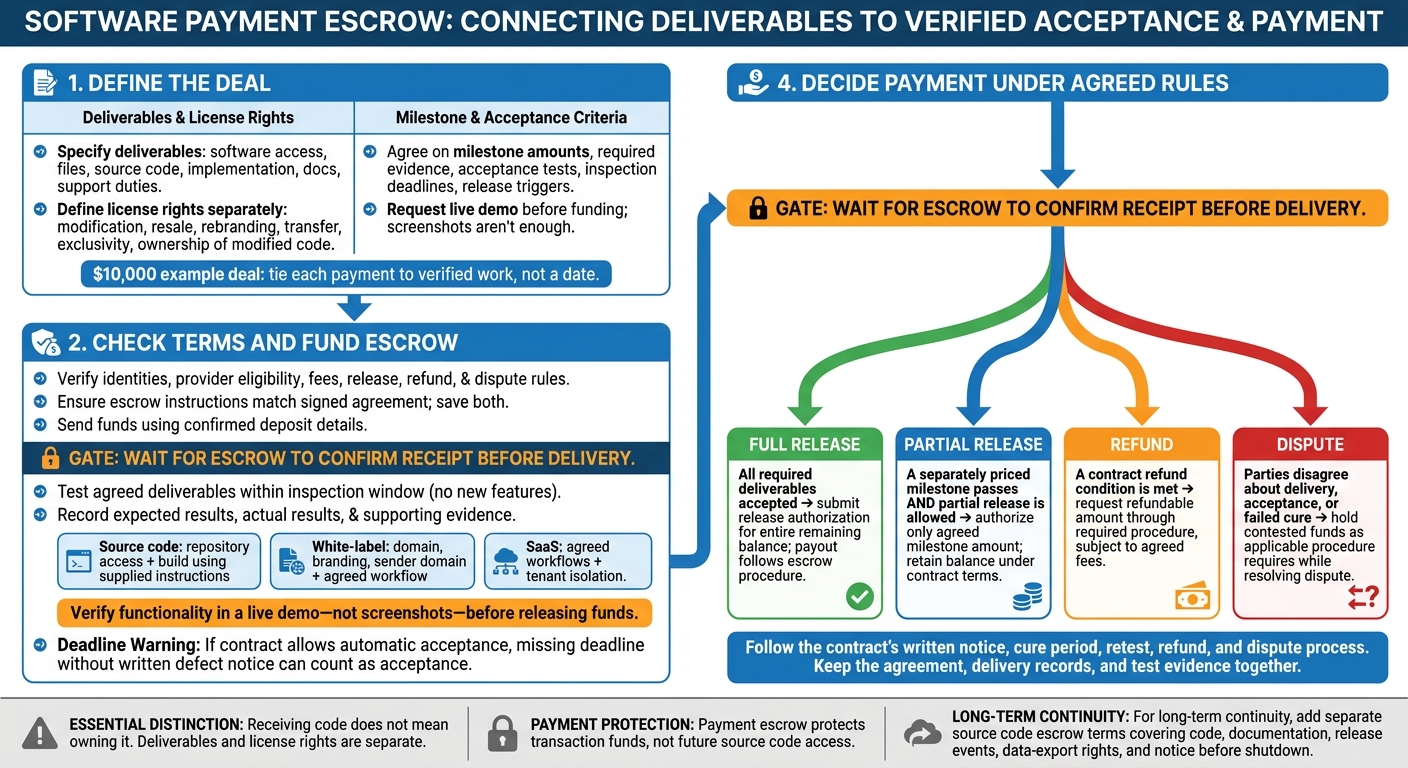
Software Escrow Payments: From Agreement to Release
I Built an Escrow Marketplace with Django, React & Paystack (Using Codex)
sbb-itb-8650f75
Step 1: Define Deliverables, License Rights, and Payments
Spell out what the deal covers: hosted SaaS access, white-label vs SaaS licensing models, source code, implementation work, or a mix of these. Keep deliverables separate from license rights. Receiving files does not give the buyer permission to modify or resell them, or transfer ownership. [2][3][6]
Then list the exact files, access, and proof the buyer must check before payment is released.
Specify Access, Files, and Usage Rights
Name the required accounts, admin access, repositories, documentation, build instructions, integrations, and branding changes. If source code is included, define the full handover package, identify third-party or open-source dependencies, and agree on how to transfer credentials securely. Request a live demo before funding to check that the software works. Screenshots aren't enough. [1][2][5]
Specify whether the rights are exclusive or non-exclusive and whether they permit modification, resale, rebranding, or transfer. Repository access alone does not establish ownership. State who owns modified code and set any territory or usage limits. For white-label deals, assign responsibility for end-user support, bugs, uptime, and onboarding, and define the support window. [2][3][5][6]
Set Payments for Accepted Milestones
Choose one final payment release or split payments across milestones. In either case, tie release to acceptance.
Use fixed dollar amounts, such as $10,000, and tie each payment to verified work, not a date. [1][2]
| Deliverable | Evidence | Acceptance | Payment | Release trigger |
|---|---|---|---|---|
| Hosted access or repository handover | Working account access or access to the agreed repositories | Buyer confirms access and files | Agreed access payment | Access milestone accepted |
| Deployment, integrations, and branding | Running deployment and completed configuration | Functionality checks pass; branding matches the agreement | Agreed deployment payment | Deployment milestone accepted |
| Documentation, onboarding, and fixes | Build instructions, handover docs, and fixes | Buyer verifies the build instructions and agreed fixes | Final payment | Final handover accepted |
With deliverables, rights, and payment triggers set, review the escrow terms before funding the deal.
Step 2: Review Escrow Terms and Fund the Deal
Before sending funds, confirm the deal room and escrow payment workflow. This is a critical part of the SaaS licensing process. LicenseSaaS provides the workflow; the parties control the escrow terms. Check that the escrow instructions match the signed deal. [1][4]
Check the Provider and Escrow Instructions
Verify both parties’ identities. Review the escrow rules for eligibility, accepted payment methods, fees, fund release, refunds, and disputes. [2][4]
Save the Agreement and Confirm Funding
Save the signed license agreement template and final escrow instructions in the deal room. Check the deposit details, send the funds, and wait for escrow to confirm receipt before moving forward. [1][4]
Once funding is confirmed, check delivery against the agreed acceptance criteria. In Step 3, use the signed agreement and escrow terms to guide inspection, acceptance, refunds, and disputes.
Step 3: Inspect Delivery and Decide Payment
Use the contract terms from the earlier steps to decide whether to accept delivery.
Define Inspection Deadlines and Acceptance Tests
Check the agreed deliverables against the contract. Set an inspection window and specify how to give written acceptance. If the contract allows automatic acceptance, delivery counts as accepted when the buyer misses the deadline without sending a written defect notice.
Test only what the agreement requires. This is a contract check, not a chance to request new features. For each test, record the expected result, actual result, and supporting evidence.
Verify Delivery Before Releasing Funds
Verify functionality in a live demo - not screenshots - before releasing funds. [5] Test each deliverable type separately. One passing check doesn’t mean the whole deal is accepted; each test must match the deliverable it covers.
| Deliverable | Verification method | Acceptance evidence | Escrow action |
|---|---|---|---|
| Source code and build materials | Confirm repository access, build using the supplied instructions, and check the agreed tech stack. | Access record, build log, and verification report. | Authorize the associated milestone only after its requirements pass. |
| White-label branding and workflows | Test the custom domain, logo, colors, sender domain, and agreed workflow. | Recorded login, branding checks, and test email. | Release the branding milestone when all required checks pass. |
| SaaS functionality and permissions | Run the agreed workflows and verify tenant isolation. | Test results, permission logs, and feature recordings. | Release the applicable payment after acceptance; report material failures before the deadline expires. |
After these checks, move to release, refund, or dispute handling.
Follow Release, Refund, and Dispute Rules
| Decision | Trigger | Evidence | Amount affected | Next action |
|---|---|---|---|---|
| Full release | All required deliverables are accepted | Written acceptance and completed tests | Entire remaining balance | Submit release authorization; payout follows the escrow procedure. |
| Partial release | A separately priced milestone passes and partial release is allowed | Accepted milestone record and outstanding-item log | Agreed milestone amount only | Authorize that amount and retain the balance under the contract terms. |
| Refund | A contract refund condition is met | Proof of non-delivery, missed deadline, or signed mutual termination | Refundable amount, subject to agreed fees | Request the refund through the required procedure. |
| Dispute | The parties disagree about delivery, acceptance, or a failed cure | Defect notice, logs, agreement, and seller response | Contested funds | Hold funds as the applicable procedure requires while resolving the dispute. |
Specify the cure period, retest process, refund trigger, and dispute steps in the contract. Follow its notice, cure, and dispute process. [4]
Conclusion: Check the Terms Before Moving Funds
Follow the sequence: define terms, fund escrow, inspect delivery, then release payment. Agree upfront on written deliverables, license rights, milestone amounts, inspection deadlines, acceptance tests, and release triggers. Keep the agreement, delivery records, and test evidence together.
Once those terms are set, review the escrow instructions before funding.
Set refund, renewal, termination, and dispute terms upfront, too. The platform helps buyers and sellers complete the deal but is not a party to it. Both sides must confirm the terms for their specific deal. [4]
For long-term access, payment escrow alone isn’t enough. Payment escrow protects transaction funds, not future source code access. If continuity matters, add separate source code escrow terms covering code, documentation, release events, data-export rights, and notice before shutdown.
FAQs
What if software bugs appear after escrow funds are released?
Once escrow funds are released, the transaction is complete, and buyers typically take responsibility for software bugs. LicenseSaaS does not verify functionality or seller claims, so check both carefully before releasing payment.
Negotiate clear support and maintenance terms that spell out who handles bug fixes and security patches. Consider a separate source code escrow agreement so you can access the codebase if the seller fails to meet their maintenance obligations.
Can I extend the escrow inspection period?
Yes, but the extension must be explicitly negotiated in the escrow agreement and tied to the deliverables, inspection window, and acceptance criteria.
If the buyer needs more time to test licensed functionality or verify delivery - for example, to check source code access - set a longer inspection deadline. Spell out when payment will be released and when refund or dispute rights take effect.
How do I align payment escrow with source code escrow?
Treat payment escrow and source code escrow as separate tools that work together. Payment escrow protects funds until delivery milestones are met, such as verified codebase access or agreed functionality checks.
Source code escrow helps keep your business running. A neutral third party holds a copy of the codebase and releases it only when defined triggers occur, such as vendor insolvency or material changes to terms.
Negotiate both before signing to protect your transaction funds and long-term access to the code needed to run your business.