
White-Label SaaS: 7 Things to Check Before Buying
Most white-label SaaS deals are not product purchases. They’re licenses with limits. If I were reviewing one today, I’d check 7 things first: white label vs SaaS licensing differences like resale rights, ownership, branding, and margins, support terms, security and privacy, and the vendor’s exit terms.
Here’s the short version: if I can’t resell under my brand, export all client data within 5 business days, lock pricing for 24–36 months, and get clear shutdown and transfer terms, I’d slow down or walk away. That matters because setup fees can run $3,000–$6,000+, annual support fees can add about 15%, and usage charges for SMS, AI, or APIs can cut margins fast.
What I’d review before signing:
- Resale rights: Can I sublicense to end clients under my brand?
- Ownership: Do I keep my templates, workflows, and custom setup?
- Branding: Can I remove vendor branding from the domain, emails, UI, and app listing?
- Margins: Are there per-seat, revenue-share, or usage fees that hurt profit at scale?
- Support: Who handles frontline support, escalations, and outage notices?
- Security and privacy: Will the vendor sign a DPA and meet GDPR/CCPA terms?
- Exit plan: Can I get full exports in CSV or JSON and enough notice to migrate?
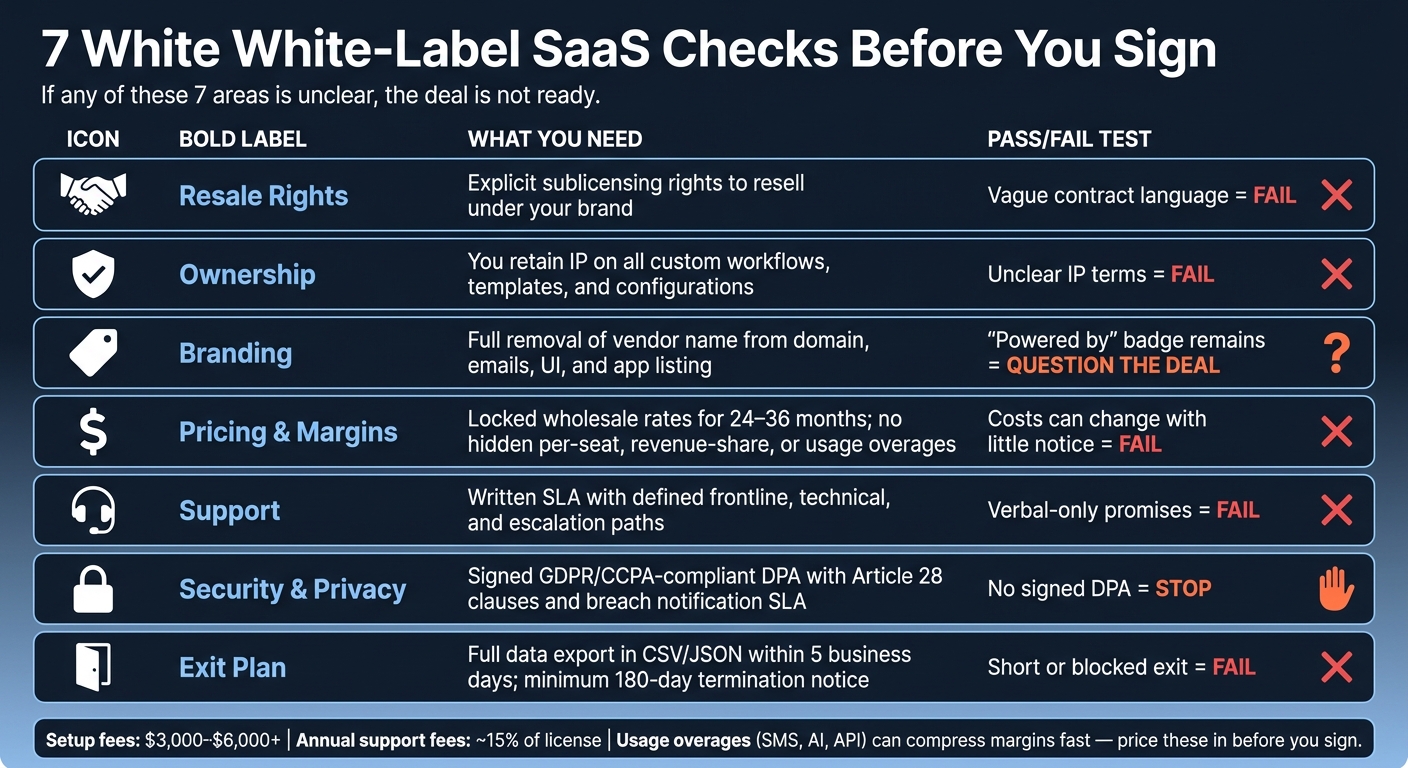
7 White-Label SaaS Checks Before You Sign
Quick Comparison
| Check | What I’d want | Simple pass/fail test |
|---|---|---|
| Resale rights | Clear sublicensing rights | If the contract is vague, fail |
| Ownership | My custom work stays mine | If IP terms are unclear, fail |
| Branding | No visible vendor name | If “Powered by” stays, question the deal |
| Pricing | Locked rates and clear overages | If costs can change fast, fail |
| Support | Written SLA and escalation path | If it’s only verbal, fail |
| Privacy | Signed DPA and breach terms | If no DPA, stop |
| Exit | Data export + long notice period | If exit is short or blocked, fail |
Bottom line: I’d treat the white label software agreement as the product. If any of these seven areas is unclear, the deal is not ready.
sbb-itb-8650f75
What 'White-Label SaaS' Actually Means
White-label SaaS can describe a few different setups. In most cases, that means source-code deals, hosted usage licenses, or partnership/reseller deals [1]. The name sounds simple, but the contract is what tells you what you can and can't do.
That detail matters more than most people think. These setups shape your margin, your support work, and even your exit options. So instead of getting stuck on the label, look at how to white-label your SaaS in practice:
| Deal Type | Branding Control | Custom Domain | Tech Effort | Control |
|---|---|---|---|---|
| Full White-Label | Full | Yes | Low | Full |
| Co-Brand | Partial | Varies | Low | Partial |
| Reseller | None | No | None | Sales only |
| API / Headless | Full | Yes | High | Full |
A “white-label” offer from one vendor may give you near-total control. Another may only let you resell under tight limits. That's why it's smart to read the contract line by line. The label by itself does not define your rights, nor does it account for the cost of building vs licensing [1][2].
Next, check the terms that control what you can resell, rebrand, and support.
1. Resale Rights and License Scope
The license sets the rules of the deal. Start there: it needs to say, in plain terms, that you can resell client accounts under your brand. If it doesn’t, setting up client accounts with your branding could still count as a license breach, even if the vendor glossed over that point on the sales call.
Commercial rights
White-label licenses don’t all give you the same room to operate.
An exclusive license gives you sole rights in a territory or vertical. A non-exclusive license means the vendor can sell the same white-label rights to other companies, including direct rivals in your market. It’s also smart to check for limits tied to geography or industry. Some licenses restrict the regions or customer groups you’re allowed to serve.
Operational control
Make sure the agreement gives you control over the parts that matter day to day: billing, contracts, provisioning, data access, and termination.
Your clients shouldn’t be able to spot the vendor behind your brand. And you shouldn’t need the vendor’s sign-off every time you need to handle routine account work. If you can’t run the account cleanly on your own, the white-label setup starts to fall apart.
Cost and margin impact
Usage-based overages, like SMS, AI, or API charges, can eat into margin fast as volume climbs. Revenue-share and tiered pricing terms do the same thing. The bigger you get, the more they take, without giving you anything extra in return.
Try to lock in pricing where you can. Then read the fine print around anything that can shift your unit economics over time. A deal that looks good at 10 clients can feel very different at 100. This is often why companies compare white-label vs. custom development to ensure long-term scalability.
Risk if the vendor fails
If the vendor gets acquired, the new owner may bump up wholesale prices, scrap the white-label tier, or shut down the program on short notice. That’s why a change-of-control clause matters. It should protect your pricing, your white-label rights, and your ability to move data if ownership changes.
Also make sure the contract gives you the right to export all client data, including contacts, history, and configurations, in a machine-readable format like CSV or JSON within a fixed transfer window.
Next, check what you actually own and what you can export if the relationship ends.
2. Source Code, Data, and Ownership Rights
The license spells out what you can do with the software. And that distinction matters: you’re licensing the software, not the code itself. So if you want protection, it has to come from the contract.
Just as important, draw a clear line between the vendor’s code and the custom work you build on top of it.
Code ownership and fallback
You do not own the source code or the hosting stack. If the vendor goes out of business, you can lose direct control overnight unless your contract gives you a way out.
One common safety net is a source code escrow arrangement. In a negotiated commercial license, a neutral third party holds a copy of the source code and releases it if the vendor shuts down [3]. It’s not common in most white-label deals, but if a big chunk of your revenue depends on one platform, it’s worth pushing for.
Ownership of custom work
Your automations, onboarding flows, templates, and custom configurations should be covered in the contract so you keep those rights.
A strong agreement should also spell out an export SLA, such as delivery within 5 business days, so you can migrate or leave without getting stuck. That can make all the difference when you need to move fast, change systems, or shut things down on your terms.
Risk if the vendor shuts down
Even if the vendor disappears, you’re still on the hook for customer data. That means the contract should clearly give you the right to export all client data, including:
- contacts
- deal history
- logs
- configurations
Ask for exports in CSV or JSON. And don’t leave timing vague. Without a fixed export deadline, migrations can drag on and create a mess.
After ownership and export rights, the next thing to review is branding and customization limits.
3. Branding and Customization Limits
Some deals let you strip out the vendor name from the domain, login screen, emails, mobile app, and in-app UI. Others still show the vendor brand in places customers can see [1][2].
That difference matters more than it may seem at first. If customers keep seeing the vendor's name, then part of the brand experience sits outside your control.
Branding surfaces
Before you sign anything, spell out every surface you can rebrand. That usually includes the custom domain, transactional emails, mobile app store listing under your own developer account, help center, terms of service, and privacy policy [2].
If the vendor name still shows up on customer-facing surfaces, then the brand isn't fully yours. It's a bit like putting your store sign on the front door while someone else's logo stays on the receipts, checkout screen, and app icon.
Operational control
| Customization Level | Branding Limits | Technical Effort | Margin Potential |
|---|---|---|---|
| Full Rebrand | Complete removal of vendor branding | Low | Highest |
| Partial ("Powered by") | Vendor branding remains partially visible | Low | Medium |
| Co-Branded | Both logos visible | None | Lower |
| API/headless | Build your own UI from scratch | High | High |
These limits hit the business side too. More branding work, extra setup, and maintenance charges can eat into margin.
Cost and margin impact
Customization isn't always part of the base price. One-time setup fees for branding and domain configuration can range from $3,000 to over $6,000, depending on the tier. Annual maintenance fees, often about 15% of the license fee, usually cover updates, security patches, and technical support [4].
Those charges can quietly squeeze your margins if you don't price them in from day one.
Get every included feature and add-on in writing before you sign. Once the branding scope is clear, check whether the pricing still leaves enough room for profit.
4. Reseller Pricing and Real Margins
Branding only matters if the white-label SaaS for resellers math still works.
The quoted price almost never shows the full cost. A deal can look good at first, then tighten fast once you add per-user fees, API charges, onboarding, support add-ons, and minimum monthly commitments.
Retail pricing control
Make sure you can set your own retail prices, bundles, and discounts without needing vendor approval. Check for minimum price rules, bundle limits, or resale caps that squeeze your margin.
Cost and margin impact
The pricing model shapes how steady your margins stay. A flat wholesale fee usually gives you the most control because your costs stay fixed while revenue goes up. Revenue share gets more expensive as you grow. Usage-based pricing is the most dangerous of the bunch. A few heavy-use clients can quietly drive costs past what you're charging.
| Pricing Model | Typical Margin Profile |
|---|---|
| Flat Wholesale | High, but open to usage overages |
| Revenue Share | Drops as reseller grows |
| Usage-Based | Volatile; needs strict usage caps to protect margin |
| Per-Seat | Stable; margins tighten unless volume tiers exist |
Run a break-even model before you sign anything. Include the vendor fee, payment processing, customer support time, sales costs, and a buffer for refunds. If the deal only works at perfect volume, the margin is probably too thin.
Get every billable line item in writing. One missed overage clause can wipe out a month of profit.
Once the pricing checks out on paper, the next step is support - who handles it, and what service levels stand behind it.
5. Support, SLAs, and Who Handles What
Support is where a white-label deal can go sideways fast. A deal may look good in a spreadsheet, but support is often where cost, strain, and risk pile up.
Support ownership
In a white-label setup, you own first-line support and the customer-facing SLA. That’s a big change from a reseller model, where the vendor may deal with support on their own.
A clean split usually looks like this:
- Frontline support: you
- Technical support: vendor
- Escalation support: vendor engineering
This split affects both staffing and service quality. Put the details in a SaaS licensing agreement: who handles frontline, technical, and escalation support, plus response and resolution times. A verbal promise isn’t an SLA.
Cost and margin impact
Weak docs and poor onboarding tend to drive up support volume. And that can eat into margin fast.
Vendors also often charge an annual maintenance and support fee for updates, patches, and technical support [1]. Build that into your margin math before you sign off on the deal.
Then pressure-test the vendor’s failure mode. Don’t just look at how things work when all is well. Look at what happens when something breaks.
Risk if the vendor fails
If the vendor goes quiet or shuts down, your customers will still come to you for uptime, answers, and fixes. That risk doesn’t disappear just because the vendor caused the problem.
Ask for service credits if SLA targets are missed, and require a written outage communication process. If there’s no escalation path or uptime commitment, you’re the one left holding the bag when the service goes down.
6. Security, Privacy, and Compliance Risks
Your customers will hold you responsible for how their data is handled, even if the vendor runs the system. Support is the part people see. Security happens in the background. But if something goes wrong, the blame still lands on your side.
Operational control
In a hosted white-label setup, the vendor controls the servers, encryption, access controls, audit logs, backups, and patching. You get the branding. The vendor runs the infrastructure.
That has a direct effect on control. Data isolation is usually managed by the vendor, and in many cases the setup is multi-tenant. In plain English, your clients may be sharing the same infrastructure with other customers. If you need single-tenant hosting, confirm it before you sign. Don’t assume it’s part of the package.
Before moving ahead, ask for proof of third-party security testing, clear details on encryption for data at rest and in transit, and a written incident response process.
Cost and margin impact
Compliance gaps don’t just create legal exposure. They can hit your margins hard. A data leak can lead to fines, legal costs, and full customer churn.
Under GDPR and CCPA, you still carry controller duties for end-client data. That means you should require a DPA with Article 28 clauses, breach notice deadlines, and certified data destruction after termination. If the vendor won’t sign a DPA, stop the deal.
Get the key duties in writing. Spell out who controls the data, who notifies customers, and who deletes records at termination.
| Contract Item | Reseller Requirement | Vendor Obligation |
|---|---|---|
| Data Processing | Reseller defines controller duties | Vendor processes data only under the DPA |
| Breach Notification | Notifies end-clients and regulators | Notifies you within a defined SLA |
| Data Portability | Right to export in JSON/CSV/API | Must provide data within 5 business days |
| Compliance | Responsible for GDPR/CCPA controller obligations | Must sign DPA and Article 28 clauses |
| Termination | 30–90 day data retrieval window | Must certify data destruction post-return |
Next, check whether the vendor can stay secure and solvent long enough to support the deal.
7. Vendor Stability and Exit Planning
After security, look at whether the vendor can still support your business if ownership, pricing, or day-to-day operations shift. If the vendor changes the rules, your customers usually feel it first.
Security is only half the test. Vendor stability tells you whether the product will still do its job when circumstances change.
Operational control
Your contract should clearly state what happens if the vendor is acquired, slows down support, or leaves the market. For mission-critical products, you need an exit path that either keeps the service live or lets you move fast without chaos.
Risk if the vendor fails
If the vendor fails or shuts down, your access to the product depends on the contract, not the logo on the homepage.
Use these terms to check whether the deal still holds up after a vendor change.
| Risk Factor | Mitigation Strategy | Contractual Requirement |
|---|---|---|
| Vendor Acquisition | Change-of-control protection | Consent required for license transfer |
| Sudden Price Hikes | Price increase cap | Renewal price lock |
| Insolvency | Exit or escrow rights | Access to codebase upon shutdown |
| Data Lock-in | Export rights | Export SLA in JSON/CSV |
| Program Termination | Advance notice period | Termination notice and transition rights |
Exit terms to review
Change-of-control protection, price locks, and termination notice and transition rights are the clauses that protect your way out. The notice period should be long enough for a clean migration, so you don't end up scrambling at the worst possible time.
Review these terms before you move on to the final decision checklist.
Decision Tables to Use During Vendor Review
Use these tables to compare vendors side by side. If a vendor leaves blanks or pushes back, treat that as a fail.
Rights and Ownership
Use this table to check what you’re buying before you sign anything.
| Checkpoint | Vendor A | Vendor B | Minimum Requirement |
|---|---|---|---|
| Resale Type | Full white-label (no "Powered by" badge) | ||
| Right to sublicense | Explicitly granted for end-clients | ||
| Exclusivity | Vertical or geographic protection | ||
| Source Code Access | Escrow or full purchase option | ||
| Controller role defined | Controller/processor role defined in the contract | ||
| Data export timing | Under 5 business days | ||
| IP of Customizations | Remains your property | ||
| Assignable on acquisition | License stays valid if vendor is acquired | ||
| Termination Window | 90–180 days' notice required |
Cost and Margin Reference
| Model | Main Cost Risk | Margin |
|---|---|---|
| Flat Wholesale | Fixed | 60%–80% |
| Per-Seat | Variable | 50%–75% |
| Revenue Share | Variable | 70%–80% |
| Usage-Based | Metered | Variable (higher risk) |
Setup fees and metered add-ons like SMS or AI credits need to be built into your pricing from day one. If the margin math falls apart here, stop the review.
Vendor-Risk Checklist
This table brings together the highest-stakes items in the review. If a vendor can’t meet these minimums, the deal carries more risk.
| Category | What to Check | Minimum Requirement |
|---|---|---|
| Branding | Remove vendor attribution and support custom domain with SSL | Yes - no visible vendor attribution; app.yourbrand.com fully supported |
| API/Customization | Export fields and logs; custom workflows and templates remain yours | All custom fields and logs accessible; you own custom workflows and templates |
| Vendor SLA uptime | Vendor uptime guarantee | Must exceed your client-facing SLA |
| SLA/Uptime | Second-line support | 24/7 second-line support included |
| Compliance | Data residency | Region-specific restrictions available |
| Compliance | DPA status | Signed, GDPR Article 28–compliant DPA in place |
| Exit Plan | Data portability | Full export in CSV/JSON within 5 business days |
| Exit Plan | Termination notice | Minimum 180 days for program termination |
Fill in the rights table and risk checklist for each vendor you’re reviewing. When a vendor dodges key fields or resists the requirements, that’s a warning sign before you commit. Next, use these scores to spot deal-breakers.
Red Flags That Should Slow or Stop the Deal
The checks above help you tell the difference between a fixable issue and a hard stop. Some gaps can be worked through. Others can wreck the economics of the deal or put your clients at risk. Treat the items below as stop signs, not bargaining chips.
Vague resale language is one of the biggest traps. If the contract does not clearly say you can sublicense to end clients, stop there.
If wholesale pricing can change with little notice, don’t move forward without a price lock in the agreement.
Also watch for non-transferable accounts and hidden per-user or API overage fees. Those terms can quietly eat into margin and make growth a headache.
Use this table to spot the biggest warning signs fast:
| Red Flag | Real Impact | What to Require Instead |
|---|---|---|
| No price lock | Major cost increase | 24–36 month contractual price freeze |
| Unclear IP ownership | Loss of business exit value | Explicit ownership of custom workflows/templates |
| Usage-based costs | Margin compression from power users | Price for high-use accounts |
| Short exit window | 90-day window to migrate all clients | Require 180-day notice for program changes |
| No signed DPA | Regulatory exposure | Include Article 28–compliant DPA in contract |
If you can’t remove badges, export data freely, or go past tight customization limits, the product isn’t fully white-label.
And if breach-notification terms are missing, or there’s no recovery plan, that’s another clear stop sign.
Conclusion
A white-label SaaS deal only works if the contract gives you the right to resell it, support it, and walk away without a mess. The contract - not the sales pitch - decides whether the deal is usable.
Before you sign, get resale rights, pricing, and exit terms in writing. Treat the seven checks as your pre-signing checklist.
When you price the product, use your actual support, processing, and usage costs. Don’t rely on the quoted wholesale fee alone before you set a price for clients.
Even if the margin looks good, the deal can still fall apart if there’s no clean exit path. Confirm export timing, migration support, and termination notice before you commit. If any of the seven checks is unclear, treat the deal as incomplete. Instead, look for proven white label SaaS products with transparent terms.
FAQs
How do I verify true white-label rights?
Check the legal and technical details, not just the sales pitch.
- Confirm the license clearly grants sublicensing rights.
- Verify the contract requires removal of the vendor’s name, logo, domain, and metadata.
- Make sure data portability rights are included, with export in a machine-readable format if the agreement ends.
- Audit the architecture to confirm it’s a true white-label setup, not just a surface-level rebrand.
What costs usually hurt reseller margins most?
Reseller margins usually take the biggest hit from hidden usage-based costs and revenue-share pricing that gets steeper as you grow.
A flat wholesale fee is easy to plan around. You know your cost, you set your price, and your margin is clear.
The trouble starts with add-on charges. Fees for SMS, AI-powered contact enrichment, or automated email sends can look small at first. But once client volume climbs, those costs stack up fast and eat into profit.
Revenue-share deals can create the same problem. They may seem fine early on, but as your sales grow, the vendor keeps taking a cut of that revenue. Over time, that can leave you making more money on paper while keeping less of it.
What should be in my exit plan?
Base your exit plan on the licensing agreement. Lock in multi-year terms with transferable rights, and make sure you own any custom configurations, templates, or integrations you built.
It also helps to spell out data portability rights. That means machine-readable exports, a clear window for getting your data back after termination, and a written note on who pays for what during the handoff.